

Xp Pen Artist22e Pro Drawing Pen Display Graphic Monitor


Rechargeable stylus for your remarkable piece.
Latest P02S stylus technology provides 8192 levels of pressure sensitivity,allowing you to create your remarkable piece with superior control and stunning fluidity. A full charge provides up to two months of scribbling, sketching, and designing.
levels


Expand your mind, create your world!
Draw, sketch, paint, and design directly on your monitor's surface! Expand your creativity and work naturally and intuitively. The Artist 22E Pro meets the needs of all types of digital artists at any skill level. The potential applications for the XP-Pen Artist 22E Pro are limitless!
Sketch
Design
Edit
Painting


Express your big ideas.
Compared to the Artist 22 Pro, it features 16 customizable shortcut keys to help you express your big ideas for convenience and efficiency. The driver allows the shortcut keys to be attuned to many different software. Fit for both left and right handed users.
16 customizable shortcut keys


HD IPS Display.
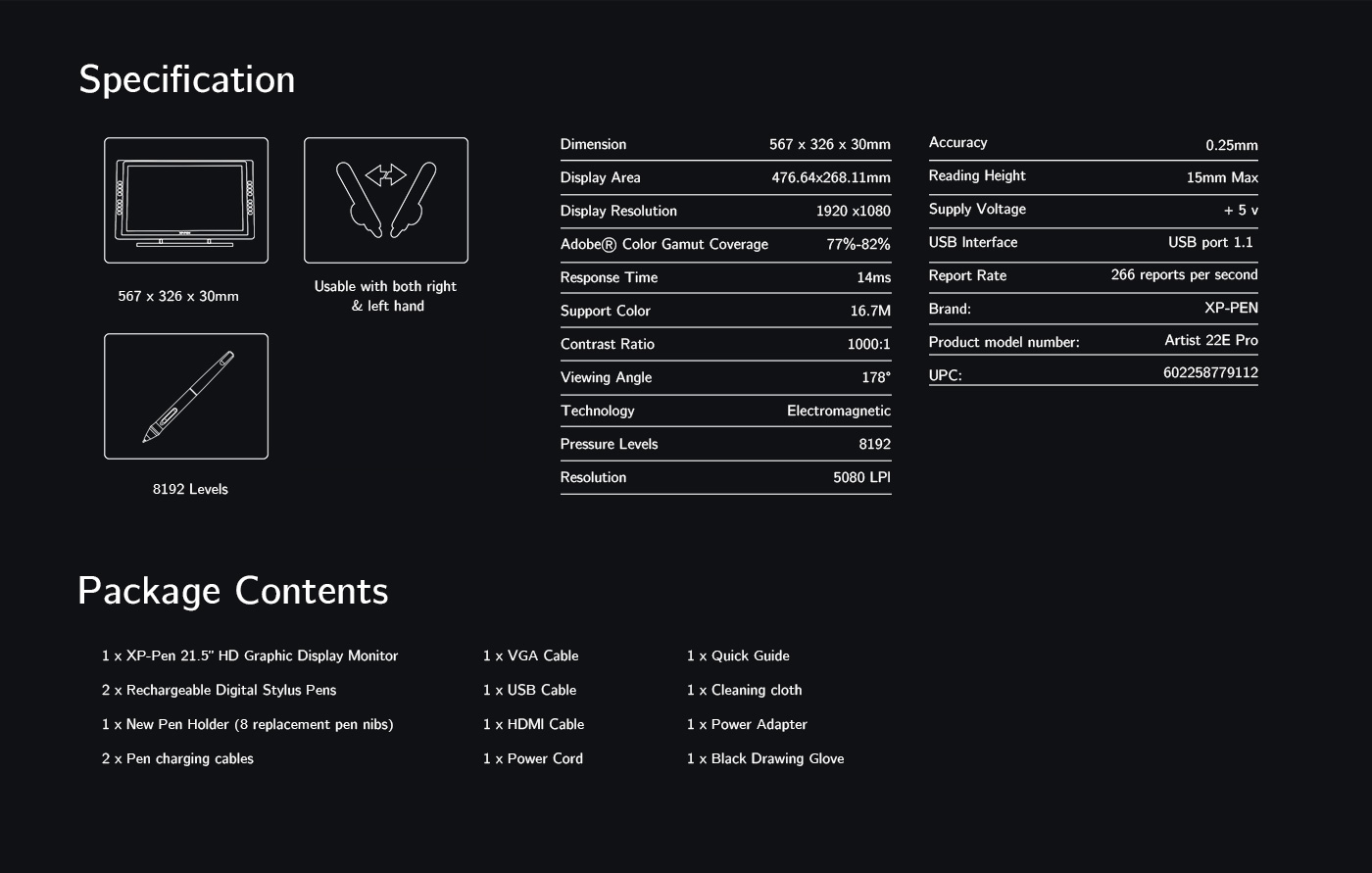
21.5 inch display features 1080p resolution with 77%-82% accurate Adobe RGB Color Gamut and an extra-wide 178° viewing angle. Delivering vibrant colors and rich detail.
178° Viewing Angle
1920x1080 pixels
Adobe® Color Gamut Coverage 77%-82%


Supports 4k displays, delight in every detail.
The Artist 22E Pro driver supports 4k displays, now you can enjoy every sharp detail. The custom-designed anti-reflective coating reduces glare by 56 percent. Your screen will continue to look clear and beautiful, even if it's bright out.
reduces glare by 56 percent


Multi-function Pen Holder.
Our Multi-function Pen Holder is included to keep your pen and pen nibs safe. You can use it as a pen stand or a pen holder, taking it wherever you go.
Non-slip rubber pad
Nibs
P02S stylus
Pen Stand
Non-slip rubber pad


Flexible, ergonomically designed stand.
The sturdy, adjustable, and ergonomically designed stand prevents shaking and sliding, providing a comfortable drawing experience. It can also be attached to a 75x75 mm vesa mount.


Versatility and Compatibility.
Supports Windows® 7/8/10, Linux (Detailed versions) and Mac Os X® 10.10 or later. Compatible with popular digital art software such as Adobe® Photoshop®, Corel Painter®, Clip Studio®, SAI®, Zbrush®, Medibang Paint®, Toonboom Harmony® etc.


All Artist displays come
with one free creative software
Learn more >
| Linux OS | Version | Package Format | Supported Software |
| Arch | Arch Linux2019.12.01(64-bit) | .deb, .sh | GIMP, Krita |
| Centos | Centos7.0(64-bit) | .rpm, .sh | GIMP |
| Centos8(64-bit) | .rpm, .sh | GIMP, Krita | |
| Debian | debian-9.5.0-amd64-netinst(64-bit) | .deb, .sh | GIMP, Krita |
| elementary OS | elementary OS 5.0(64-bit) | .deb, .sh | GIMP, Krita |
| ezgo Linux | ezgo14(64-bit) | .deb, .sh | GIMP, Krita |
| Fedora | Fedora32(64-bit) | .rpm, .sh | GIMP, Krita |
| Mageia | Mageia-7.1(64-bit) | .rpm, .sh | GIMP, Krita |
| Manjaro | manjaro-xfce-20.1.2-201019(64-bit) | .deb, .sh | GIMP |
| Mint | linuxmint-18.2-cinnamon-64bit | .deb, .sh | GIMP, Krita |
| OpenSUSE | openSUSE-Tumbleweed(64-bit) | .rpm, .sh | GIMP, Krita |
| Pop!_OS | pop-os_19.10(64-bit) | .deb, .sh | GIMP, Krita |
| Red Hat | Red Hat7(64-bit) | .rpm, .sh | GIMP |
| Ubuntu | Ubuntu14.04(64-bit) | .deb, .sh | GIMP, Krita |
| Ubuntu16.04(64-bit) | .deb, .sh | GIMP, Krita | |
| Ubuntu17.04(64-bit) | .deb, .sh | GIMP, Krita | |
| Ubuntu18.04(64-bit) | .deb, .sh | GIMP, Krita | |
| Ubuntu19.04(64-bit) | .deb, .sh | GIMP, Krita | |
| Ubuntu20.04(64-bit) | .deb, .sh | GIMP, Krita |
| Function | Krita 4.3.0 | Gimp 2.10.20 | Inkscape 0.92 |
| Pen Pressure Sensitivity | |||
| Tilt | |||
| Mouse Function | |||
| Eraser Button (Stylus:PH01, P06) | |||
| Switch between Pen and Eraser Modes | |||
| *If you have any further queries, please do not hesitate to contact us at service@xp-pen.com. | | ||
Xp Pen Artist22e Pro Drawing Pen Display Graphic Monitor
Source: https://www.storexp-pen.com.au/buy/61.html
Posted by: garretttennesers69.blogspot.com
0 Response to "Xp Pen Artist22e Pro Drawing Pen Display Graphic Monitor"
Post a Comment